

Pick up your teen’s phone. Scroll through the home screen. Count the study and productivity apps.
A typical high school student in Fairfield County or Westchester has 14 of them: Quizlet, Notion, Forest, Anki, Khan Academy, Photomath, Otter, GoodNotes, Notability, Brainly, Chegg, Sparknotes, Wolfram Alpha, ChatGPT. Some have more.
Of those 14, your teen is genuinely using 2 or 3. A few are quietly making things worse (yes, Notion can be a distraction). The other 9 or 10 are what we call productivity theater. They look like studying, feel like studying, but they are mostly opening and closing.
This is the parents’ guide to which study apps actually move the grade in 2026, which are overhyped, and which should come off the home screen this weekend. Memorial Day is a quiet enough moment to do this with your teen in about 15 minutes.
Do study apps actually help students learn?
Some do. Most do not. The apps that actually help share three traits: they reduce friction in a real study task, they do not replace the cognitive work, and they are invisible enough that the student forgets they are using one.
There is real research behind a small number of categories. Spaced-repetition flashcard tools, for example, are backed by decades of cognitive psychology research on retrieval practice. The work of Karpicke and colleagues at Purdue, cited in our post on note-taking, supports the underlying mechanism.
Most other apps are not backed by research showing they improve learning. They are backed by metrics showing students engage with the app, which is not the same thing. Engagement is easy to design for. Learning is not.
The practical test for any study app: does using it require your teen to do the cognitive work, or does it do the work for them? If the app is doing the thinking, the grade may go up briefly, but the learning will not.

What are the 5 categories of study apps, and what works in each?
Every study app on your teen’s phone falls into one of five categories. Here is the honest review of what works, what is overhyped, and the ADHD-friendly pick in each.
| Category | What S4 Recommends | What’s Overhyped | ADHD-Friendly Pick |
|---|---|---|---|
| Focus / Pomodoro | Forest, Pomofocus, or the free iPhone Focus mode | Habitica and other heavily gamified “productivity systems” | Forest plus the Time Timer app for a visual countdown |
| Note-taking | GoodNotes or Notability with a Cornell template | Notion as a note-taking system (it pulls students into setup work) | GoodNotes with pre-built Cornell pages for each class |
| Flashcards | Anki for high-stakes memorization, Quizlet for quick review | Quizlet’s AI-generated answers used in place of practice | Anki with a daily phone reminder built into the lock screen |
| Planning / Organization | Apple Reminders plus Apple Calendar (or Google equivalents) | Notion as a planner (too much setup, too many decisions) | Apple Reminders with time-based alerts and Siri voice input |
| AI Study Tools | NotebookLM for textbook chapters; Khan Academy AI tutor for concept gaps | Using ChatGPT or Claude to write essays or generate summaries that replace reading | NotebookLM with the audio overview feature for auditory learners |
Focus and Pomodoro apps
The mechanism (timed work sessions with short breaks) is real. The Pomodoro technique consistently outperforms unstructured study time in research on attention and task completion.
What works: Forest (gamifies focus with a growing tree) and Pomofocus (a clean, free web timer). The iPhone Focus mode is a free alternative that blocks notifications during study windows.
What is overhyped: Habitica and other heavily gamified productivity platforms. Most students spend the first week designing their character and the second week ignoring it. Stick with the simple timer.
Note-taking apps
GoodNotes and Notability are the two strongest options for students who take notes on a tablet with a stylus. Both support Cornell templates and have AI features that, used carefully, can help with review. See our May 3 post for the underlying methods.
What is overhyped: Notion as a note-taking system. Notion is genuinely powerful, but it pulls most students into hours of setup, formatting, and database design before any actual notes get taken. For 90% of high school students, that time would have produced better notes in GoodNotes.
Flashcards
Anki is the gold standard. It uses spaced repetition (the research-backed practice of reviewing material at increasing intervals) and is ugly, free, and incredibly effective. Best for high-stakes memorization: vocabulary, dates, formulas, anatomy, foreign language.
Quizlet is prettier and faster to set up. Good for quick review the night before a quiz. The Quizlet AI feature is where students get into trouble: it generates flashcards from a textbook chapter or set of notes in seconds, which skips the encoding work that makes flashcards effective in the first place. Use the manual creation tool, not the AI generator.
Planning and organization apps
For most teens, Apple Reminders plus Apple Calendar (or the Google equivalents) is enough. Simple, native to the phone, no setup. Todoist is fine if your teen needs more structure.
What is overhyped: Notion as a planner. Same pattern as Notion for notes. The setup overhead is enormous, the system breaks the first time a deadline shifts, and the rebuild is more work than just using a calendar. The principle here: simpler is better. The planning system your teen actually uses beats the elegant one they abandon by October.
AI study tools
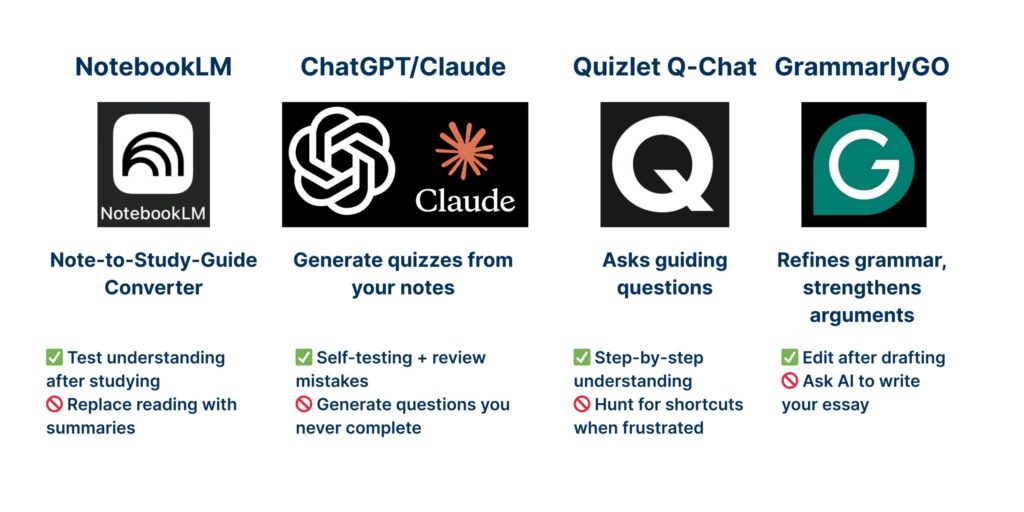
AI tools are useful when they are summarizing or quizzing material the student has already engaged with. They are harmful when they replace that engagement. We covered the full framework in the May 3 post on note-taking and AI; the short version applies here.
What works: NotebookLM (Google’s tool that lets students upload a textbook chapter and ask questions about it) is genuinely useful for reading comprehension and review. Khan Academy’s AI tutor (Khanmigo) is a strong tool for filling concept gaps in math and science.
What is overhyped: ChatGPT and Claude when used to generate essays, summarize readings the student has not read, or write code the student does not understand. They are excellent tutors and dangerous shortcuts. The line between the two matters.
Which apps work best for ADHD students?
The principles for ADHD students are different from the general recommendations. Reduce decision-making, externalize structure, and build dopamine into the system itself.
The strongest combinations for ADHD students in our coaching:
- Forest plus a Time Timer app. The visual countdown is more effective for ADHD brains than a numeric timer alone.
- Apple Reminders with time-based alerts. Not Notion. The lower the decision load, the higher the use rate.
- Anki with a hardware reminder. A daily lock-screen prompt at the same time every day. ADHD students rarely remember to open an app; they reliably open one when their phone reminds them about.
- FocusMate or another body-doubling app. A scheduled video session with another student or worker quietly doing their own work. The research on body doubling for ADHD focus is strong, and the social accountability does what a timer alone cannot.
How many study apps does my teen actually need?
Three to five. Not fourteen.
Most students who consolidate to 3 to 5 study apps use those apps far more reliably than students who maintain 14. The cognitive overhead of choosing among options at study time is a real tax. Fewer choices, more action.
Here is a 4-question audit you can do with your teen this weekend. It takes about 15 minutes. Save it on your phone or print it for the kitchen counter.
The download includes the full step-by-step checklist plus a “Three That Stay” worksheet for picking the focus, planning, and study tool your teen will keep.

What study apps does S4 use with students?
Our coaching philosophy on apps is simple: one tool per category, and the simplest one in each category that your teen will actually use.
In a typical coaching engagement, we introduce:
- One focus tool. Usually, Forest or the built-in iPhone Focus mode.
- One planning tool. Apple Reminders plus the calendar for most students, occasionally Todoist.
- One note-taking method (Cornell or mind mapping, with GoodNotes or a paper notebook, depending on the student).
- One retrieval-practice tool. Anki for serious memorization, Quizlet for quick review.
- Clear principles for AI use. Where it helps, where it hurts, when to ask permission from the teacher.
Five tools. Clear roles. Used consistently. That is the system that works.
📞 Call us at 203-307-5455 if you want help building the system underneath the apps. The apps are the easy part; the habits around them are the harder work, and our coaching and August workshop both teach exactly this.
Frequently Asked Questions
Are study apps actually effective for high school students?
Some categories are: spaced-repetition flashcard tools, timer-based focus apps, and AI tools used for review rather than generation. Most other apps have no research showing they improve learning outcomes. The strongest predictor of whether an app helps is whether the student uses it consistently for at least 6 weeks. Apps adopted and abandoned within 2 weeks (most of them) have no measurable effect.
Is Quizlet still useful in 2026?
Yes, with one caveat. Quizlet is still excellent for quick review the night before a quiz, especially for vocabulary and definitions. The caveat: the Quizlet AI feature that generates flashcards automatically from a textbook or set of notes shortcuts the encoding work that makes flashcards effective. The act of creating the flashcard is half of what makes flashcards work. Have your teen create their cards manually, even if it takes longer.
What is the best free Pomodoro app?
Pomofocus is the cleanest free web-based option. The built-in iPhone Focus mode (free, native, blocks notifications) is the simplest. Forest is free on the web and inexpensive on mobile, with the added gamification feature of planting a virtual tree during focus sessions. All three work; the best one is the one your teen will actually use.
Should my ADHD teen use Notion?
Probably not, at least not as a planner or note-taking system. Notion requires significant setup, ongoing maintenance, and constant decision-making about where things go. ADHD brains do better with low-decision, externally-structured tools: Apple Reminders for planning, GoodNotes with pre-built templates for notes. Notion is a powerful tool for organized minds. It is a trap for minds that need a tool to do the organizing for them.
How do I get my teen to actually use the apps they download?
Two principles. First, consolidate to fewer apps so each one has a clear role. Most teens with 14 apps use 2 of them; most teens with 4 apps use all 4. Second, build in environmental cues: hardware reminders, lock-screen widgets, app placement on the home screen. Apps that require remembering to open them rarely get opened. Apps that interrupt the phone screen at the right time get used.
What is the difference between Anki and Quizlet?
Anki uses spaced repetition (an evidence-based learning technique that shows you cards at scientifically optimized intervals based on whether you got the previous card right). It is ugly, free, and the gold standard for serious memorization. Quizlet is prettier, faster to set up, and better for short-term review, such as the night before a vocab quiz. For high-stakes long-term learning (medical terms, foreign language, AP content), Anki wins. For a quick review of a unit, Quizlet is fine.
One conversation, not a confrontation. Most teens will agree to delete more than you expected once they realize how much is just sitting there.
Local Resources for Fairfield County and Westchester Families
S4 Study Skills works with students across Fairfield County, CT and Westchester County, NY, including Greenwich, Darien, Westport, New Canaan, Southport, Armonk, Scarsdale, and Chappaqua. Our 1:1 coaching and August Essential Study Skills Workshop both teach the systems and habits underneath the apps, not just the apps themselves.

