

QUICK ANSWER
Parent portals show grades as soon as teachers enter them, which makes daily checking easy and tempting. For many families, daily checks shift ownership of grades from the student to the parent, turn single scores into conflicts, and react to numbers that may not be final. A set weekly review, led by your child, keeps you informed without taking over.
It usually starts with good intentions. The school sends a login, you bookmark the page, and checking becomes part of the morning coffee.
Then one day a 64 shows up on a quiz, and your child has not mentioned it. By dinner you have a question ready, and your child has a look on their face that says they already know where this is going.
If that sounds familiar, the fix is usually smaller than it feels: a change in when you look, and who looks first. Below is what the research actually shows, a check schedule by grade, and what to do when a low score appears.
PART 1: The Trap
What is the parent portal trap?
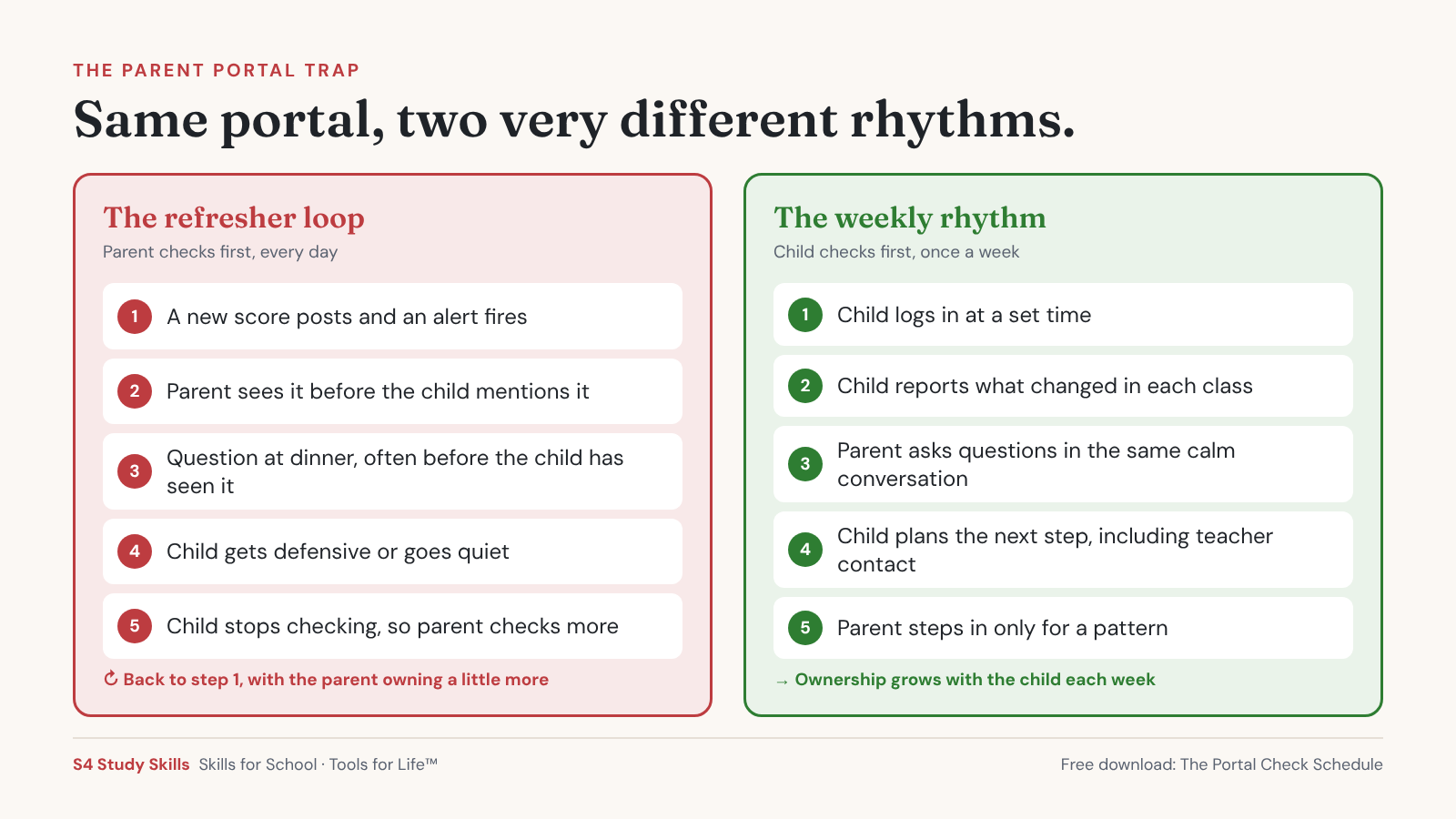
The parent portal trap is a checking pattern where a parent monitors grades so often that the parent ends up owning them. The portal shows every score in real time. Checking it every day, or reacting to every alert, slowly moves the job of tracking grades from your child to you.
The portal is a useful tool. It shows missing work early, helps you spot a class that is slipping, and gives you something specific to ask about. The trouble comes from the rhythm:
- You see the grade before your child mentions it, so the conversation starts with your question instead of their update.
- Each score gets its own reaction, even scores that will barely move the quarter grade.
- Your child learns that someone else is watching, so they stop watching.
That last point is the one that costs the most over time. Tracking grades, noticing a problem, and deciding what to do about it are executive function skills your child needs for high school and college. A parent who checks first every day is practicing those skills on their child’s behalf.
Why can daily grade checks backfire?
Because a single day’s view of the portal is often incomplete, and the conversation it starts usually happens at the wrong time. Here is what tends to go wrong:
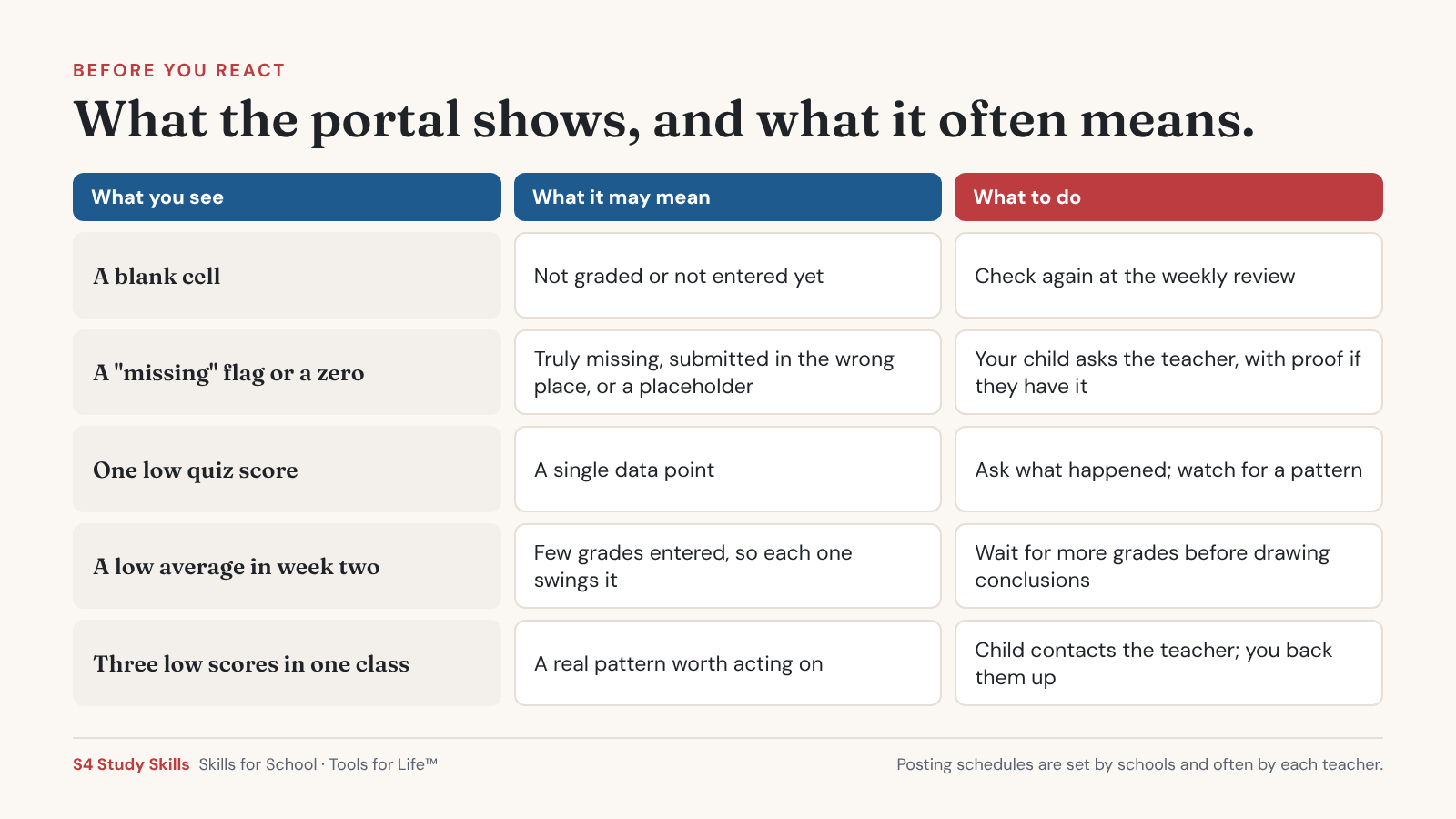
- Single scores are noisy. One quiz is one data point. Early in a quarter, with only a few grades entered, one low score can drop an average sharply and then recover as more work is graded. We wrote about this pattern in why grades swing from As to Cs.
- A blank may mean “not entered yet.” Teachers grade and post on their own timelines. An empty cell or a flag sometimes just means the teacher has not graded or entered the work yet.
- Posting schedules vary by teacher. One teacher posts the same day. Another posts in batches every two weeks. A daily check compares classes that are not on the same clock.
- The conversation lands at the wrong moment. A grade you saw at 7 a.m. becomes a question at 7 p.m., often before your child has seen the score or talked to the teacher.
- Your child stops checking. When a parent already knows every grade, there is little reason for a student to log in at all.
Daily checking vs. a weekly review
| What changes | Daily checking | A weekly review your child leads |
| Who owns the grade | Slowly shifts to the parent | Stays with your child |
| Emotional temperature | Spikes with every new score | Calmer, because scores are seen together |
| Accuracy of what you see | Partial. Ungraded work and unentered scores look like problems. | Better. More of the week’s work has been entered. |
| When the talk happens | Whenever you happen to look | At a set, predictable time |
| What your child learns | Someone else will notice for me | Tracking my grades is my job |
PART 2: What the Research Shows
What does research say about parent portals?
Research on parent portals is still limited, and nothing we found shows that checking more often, or less often, changes a student’s grades. What exists is useful for understanding how families use portals and what students, parents and teachers say about them.
How often students check
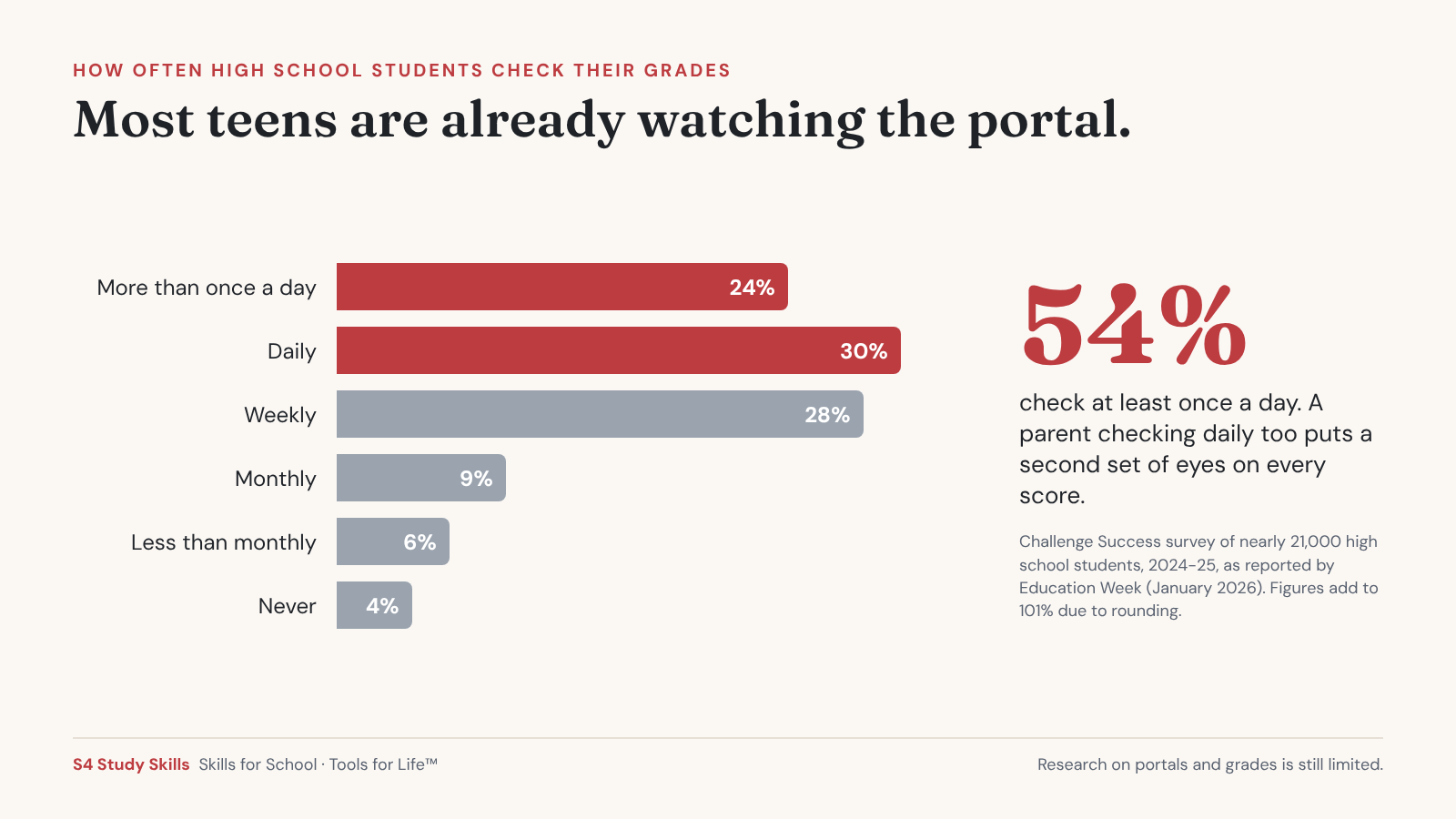
The nonprofit Challenge Success asked nearly 21,000 high school students during the 2024-25 school year how often they check their grades online. Education Week reported the results in January 2026:
How often high school students check their grades online (2024-25)
| How often | Share of students |
| More than once a day | 24% |
| Daily | 30% |
| Weekly | 28% |
| Monthly | 9% |
| Less than once a month | 6% |
| Never | 4% |
That means more than half of these students check at least once a day. (The figures add to 101 percent because of rounding.) If your teen already checks constantly, a parent checking constantly too adds a second set of eyes to every score.
What students, parents and teachers say
A 2026 study in the Journal of School Health interviewed 5 students, 7 parents and 12 teachers at secondary schools in the Netherlands that use a parent portal.
- Benefits they described: better communication with teachers and more support from parents.
- Concerns they raised: student autonomy, privacy and wellbeing, plus extra workload for teachers.
- What the authors suggested: unrestricted parent access may lead to over-monitoring, and limiting parent access to set times could keep parents informed while protecting student independence.
This is a small study from outside the United States, built on interviews rather than outcomes, so it describes concerns rather than proving effects. It still lines up with what many families describe at home.
What schools are trying
The same Education Week article described school leaders weighing the value of transparency against students leaning on parents to track everything. At Arundel High School in Maryland, for example, students are encouraged during weekly homeroom to look up their own grades and GPA and to set up meetings with teachers when they need to.
The bigger picture on parent involvement
Broader research on parent involvement points in the same direction, even though it was not about portals specifically:
- A 2009 meta-analysis of 50 studies of middle school students found that most forms of parent involvement were positively associated with achievement, with the exception of help with homework. The strongest association came from academic socialization: talking about why school matters, setting expectations, and connecting schoolwork to future goals.
- A 2007 review in Review of Educational Research concluded that “how parents become involved determines in large part the success of their involvement.”
Both found associations without testing cause and effect, and neither studied grade portals. Together they suggest that being involved matters, and that the kind of involvement matters more than the amount.
PART 3: A Better Rhythm
How often should parents check the parent portal?
For most families, once a week is enough, and your child should look first. Below is the schedule we recommend at S4. It is a starting point, so adjust it to your child and your school.
The Portal Check Schedule
| Grade band | How often | Who checks first | Parent role |
| Grades 6 to 8 | Once a week, together. Twice a week is fine for the first quarter of sixth grade or a new school. | Your child logs in and walks you through it | Co-pilot. Ask questions, help plan next steps. |
| Grades 9 and 10 | Once a week, at a set time | Your child checks and reports | Listener. Glance to confirm, then let them lead. |
| Grades 11 and 12 | Every two weeks, plus progress report and quarter-end checkpoints | Your child, on their own | Consultant. Available when asked. |
| Any grade, short-term plan | As agreed, with an end date | Agreed together | Temporary support, written down |
The goal by senior year is a student who tracks their own grades without being asked, because that is exactly what college will expect.
We put the schedule, the weekly review questions, and a “bad grade” plan on one page you can keep near the computer.

How do you turn portal checks into your child’s habit?
Give the job to your child, give it a set time, and keep it short. Three pieces make it work:
- Your child checks first and reports. They log in, look at every class, and tell you what changed. You can look afterward if you want to, but the update comes from them.
- A ten-minute weekly review at a set time. Sunday afternoon or Thursday after dinner both work. Pick a time that stays the same each week and is not the night before a big test.
- Notification settings that match the schedule. Some portals let families choose alerts by grade threshold or as a summary instead of every new score. Options differ by platform, so check your district’s help page.
Five questions keep the weekly review focused:
- What changed since last week?
- Is anything missing, and is it really missing or just not entered yet?
- Which grade surprised you, up or down?
- What is coming up next week?
- Is there anything you need to ask a teacher about, and when will you?
If your child cannot answer the last question on their own yet, that is useful information too. Our Homework Police Retirement Guide walks through a four-week plan for handing that kind of responsibility back.
Fairfield and Westchester families
Districts across Fairfield and Westchester counties use different portal platforms, and notification settings differ by platform. Check your district’s portal help page for how to change alert frequency. Grade posting timelines are set by schools and often by individual teachers, so the course syllabus or a quick question at back-to-school night is the best way to learn when each class posts grades.
What should you do when you see a bad grade?
Pause, ask, look for a pattern, and let your child contact the teacher first. A low score is information. How you respond decides whether your child keeps sharing information with you.
When you see a bad grade in the portal
| Step | What to do | What to say |
| 1. Pause | Wait for the weekly review, or at least until you are calm and your child is home. | Nothing yet. |
| 2. Ask | Start with a question. | “I saw the chemistry quiz posted. What happened on that one?” |
| 3. Look for a pattern | One low score is a data point. Three in the same class, or a string of missing work, is a pattern. | “Is this the first one like this, or has the class been getting harder?” |
| 4. Child contacts the teacher | Your child emails or visits the teacher to ask what went wrong and whether they can correct it. | “What do you want to ask your teacher, and when will you ask?” |
| 5. Parent steps in | Only if the pattern continues, or your child has tried and needs backup. | “Let’s write to the teacher together.” |
Step 4 is where a lot of growth happens. Asking a teacher for help is a skill, and there is a right and a wrong way to do it. Our post on what not to do when asking a teacher for help covers the common mistakes.
A low score can stir up a lot of worry for parents, too. If you notice your own stress rising every time you open the portal, our post on ways parents unintentionally increase test stress is worth a read.
When is closer monitoring the right call?
When it is short, specific, and agreed with your child. Stepping back does not mean never stepping in. Closer monitoring makes sense in a few situations:
- A short-term plan you both agree to. Your child knows you will check twice a week for the next three weeks, and why.
- After a specific setback, like a failed test or a stretch of missing work, with an end date written down.
- As part of an IEP or 504 plan, where the team has agreed on how progress will be monitored and who does it.
What separates these from the trap is the end date and the agreement. Your child knows what is happening, why, and when it stops.
If closer monitoring keeps coming back, the underlying problem may be planning, starting, or keeping track of work. That is what executive function coaching is built for, and a coach can take over some of the checking so it stops being the main thing you and your child talk about.

PART 4: The Bigger Picture
How does portal use fit the bigger handoff?
Checking the portal is one of the homework jobs worth handing back to your child, along with tracking assignments and emailing teachers. Each one is small. Together they add up to a student who knows where they stand without being told.
Last week we looked at a related question about what to watch when your child uses AI for schoolwork, in What Good AI Use Actually Looks Like, Grade by Grade. In both cases, the goal is the same: you stay informed, and your child does the work of knowing.
Frequently asked questions
How often should I check my child’s grades online?
For most families, once a week is enough. Pick a set time, have your child log in first and walk you through each class, and save questions for that conversation. In middle school, do it together. By eleventh and twelfth grade, every two weeks plus progress report checkpoints usually works.
Is it bad to check the parent portal every day?
Checking daily is not harmful by itself, but for many families it creates problems. Daily checks can shift ownership of grades from the student to the parent, turn single scores into conflicts, and react to grades that have not been fully entered yet. No research we found shows daily checking improves grades.
Should my teenager have access to their own grades?
Yes. Many school portals offer a separate student login, so ask the school if your child does not have one. Checking their own grades is a skill students will need in college, where parents typically cannot see grades unless the student shares them. Some high schools now build time for students to check their own grades into the school week.
Why does the portal show a missing assignment my child says they turned in?
There are a few common reasons. The teacher may not have graded or entered it yet, the work may have been submitted in the wrong place, or it may truly be missing. Have your child check with the teacher first and bring proof of submission if they have it.
Should I turn off grade notifications?
Consider changing them rather than turning them off. Some portals let you choose a weekly summary or set alerts only for grades below a certain score, which supports a weekly routine better than an alert for every new grade. Settings differ by platform, so check your district’s portal help page.
What should I say when I see a low grade in the portal?
Start with a question. “I saw the quiz posted. What happened on that one?” invites your child to explain. Wait until you are calm and your child is home, look for a pattern before reacting to one score, and ask what they plan to say to the teacher.
When should I contact the teacher about a grade?
After your child has tried first, unless there is a safety or health concern. If your child has asked and still needs help, or the same problem keeps happening in one class, a short note from you makes sense. Writing it together keeps your child part of the conversation.

